




In the fast-paced world of crypto futures trading, market volatility can quickly move positions toward liquidation. To help traders stay protected and manage their risk more effectively
That’s where ZebPay’s new Auto-Top Up feature steps in. Designed to keep your positions alive during volatile market conditions, it automatically adds funds from your wallet when your margin balance starts running low, so you don’t have to constantly monitor your screen.
What Is the Auto Top-Up Feature?
The Auto Top-up feature automatically adds margin to your open position when it’s close to liquidation. This ensures that your trade remains active and protected against sudden market swings without the need for constant manual intervention.
How Does It Work?
Once enabled, Auto Top-up monitors your open futures positions in real-time.
When the Margin Ratio of a position reaches 70%, the system automatically adds additional margin to help avoid liquidation. The amount added depends on your leverage level:
For positions with 1–20x leverage, 1.5× Maintenance Margin is added.
For positions with 21–75x leverage, 2× Maintenance Margin is added.
This top-up happens instantly, ensuring that your position gets the protection it needs before liquidation triggers.
Partial Refilling
If your wallet doesn’t have enough funds for a full top-up, the system will add whatever amount is available. After that, Auto Top-Up is automatically turned off for that position until you manually enable it again after adding funds.
Transparency at Every Step
Whenever Auto Top-Up is triggered, you’ll receive an email notification with complete details, including:
- Pair name (e.g., BTC-USDT)
- Side (Long/Short)
- Leverage used
- Amount topped upx
- Initial vs. updated margin
- Time of top-up
You’re always in control and fully informed!
How to Enable Auto-Top Up
App
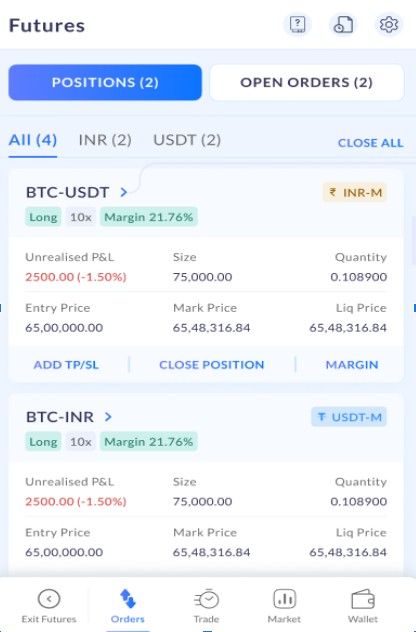
1. Open the ZebPay app, navigate to Futures, and tap on Orders.
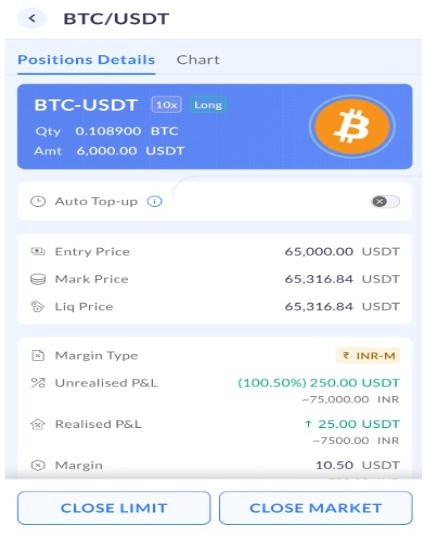
2. Under Positions, select the trade you want to enable Auto-Top Up for, such as BTC-USDT. Tap on the Auto-Top Up option to access the feature.
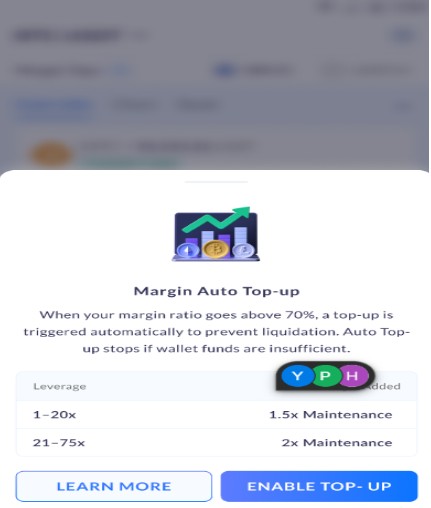
3. A disclaimer will appear explaining that when your margin ratio reaches 70%, a top-up is automatically triggered to prevent liquidation. It will also note that Auto Top-Up will stop if wallet funds are insufficient. Furthermore, your leverage details along with the margin to be added will get displayed on the screen. If you agree, tap on Enable Top-Up to activate the feature. Otherwise, tap on Learn More to review the details further.
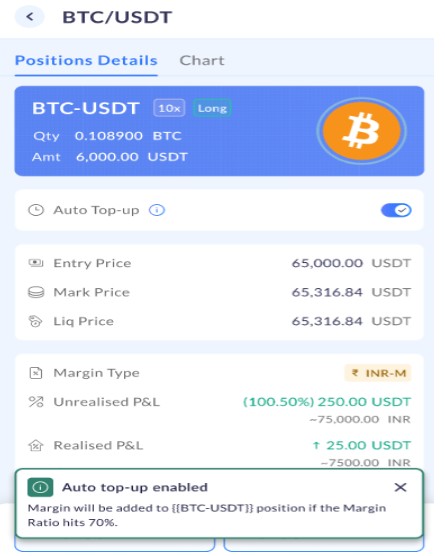
4. Once enabled, a blue tick will indicate that Auto Top-Up is active for your selected position. A confirmation pop-up will appear, stating that – Margin will be added to {{BTC-USDT}} position if the Margin Ratio hits 70%.
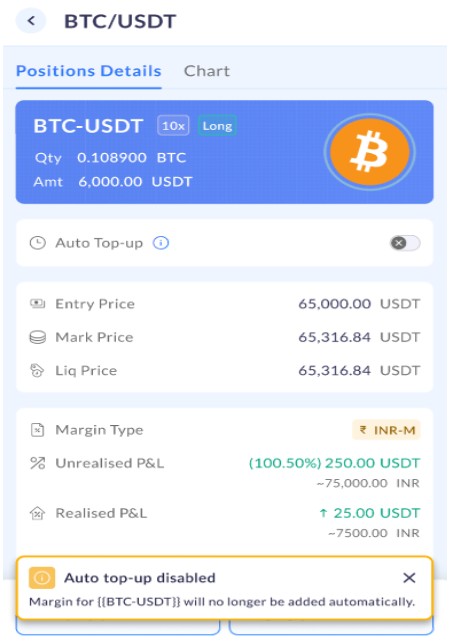
5. To disable Auto-Top Up, simply tap the blue tick again, and the feature will be turned off. A confirmation pop-up will appear, stating that – Margin for {{BTC-USDT}} position will no longer be added automatically.
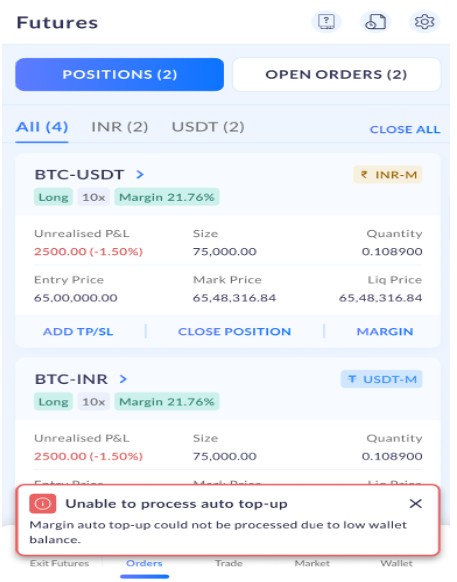
6. In case your wallet balance becomes insufficient, Auto Top-Up will automatically pause, with a confirmation pop-up stating that – Auto top-up has been stopped for {{BTC-USDT}} due to low wallet balance.
Website
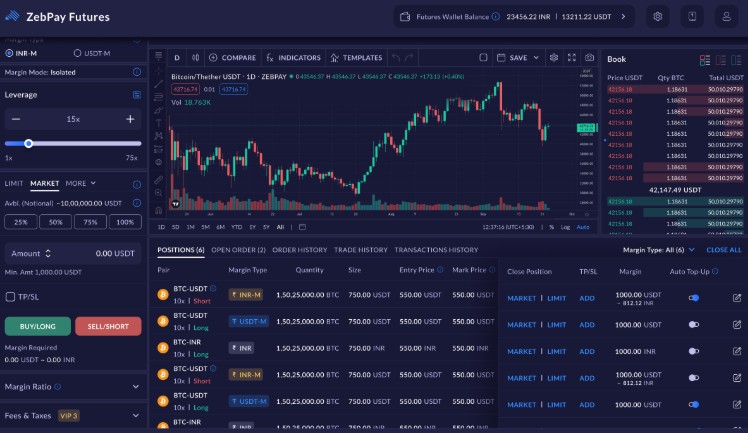
1. Visit the ZebPay website, log in, and go to Futures. Navigate to Positions and select the trade you want to enable Auto-Top Up for, such as BTC-USDT.
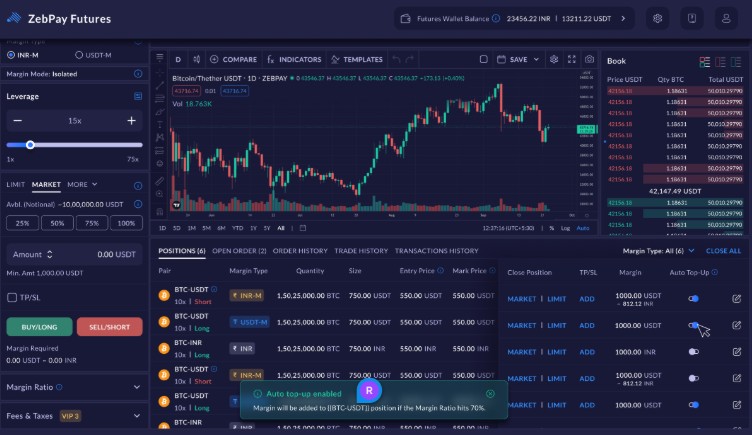
2. Click on Auto-Top Up for that position. A pop-up will confirm that the feature has been enabled, stating that margin will be automatically added if the Margin Ratio reaches 70%.
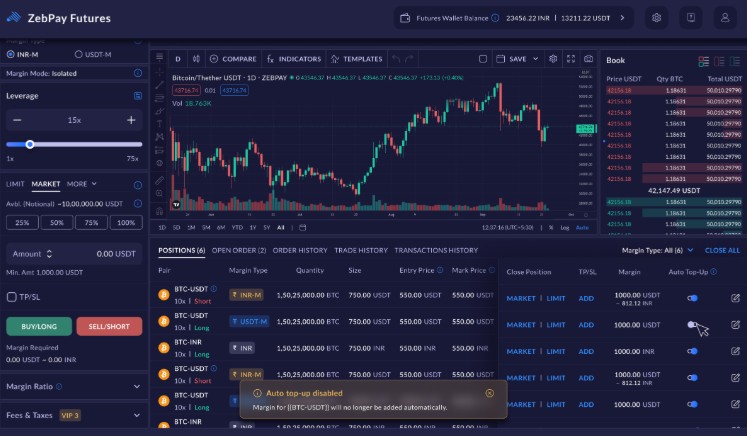
3. To disable Auto-Top Up, click the button again. A confirmation pop-up will appear, stating that margin will no longer be added automatically for that position.
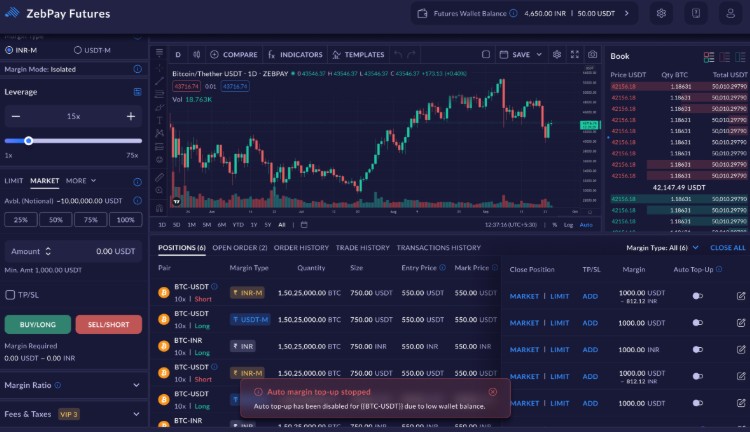
4. If your wallet balance becomes insufficient, Auto-Top Up will automatically pause, and a pop-up will appear to notify you that it has been stopped due to low wallet funds.
Let’s Understand Auto Top-Up with an Example
Let’s say Aarav is trading Bitcoin Futures on ZebPay.
- He opens a long position worth ₹10,000 using 10x leverage.
- That means his own margin (investment) is only ₹1,000, and the rest is borrowed.
- The maintenance margin, the minimum required to keep the position open is ₹200.
Now, because the market turns volatile, the price of Bitcoin drops, and Aarav’s margin ratio reaches 70%, meaning his position is getting close to liquidation.
But Aarav had enabled Auto Top-up earlier.
So here’s what happens automatically:
- ZebPay detects that his margin ratio has reached 70%.
- Since Aarav’s leverage is 10x (1–20x range), 1.5× Maintenance Margin = ₹300 is automatically added from his Futures Wallet.
- His new margin balance increases, giving his trade more breathing space and helping him avoid liquidation.
If Aarav only had ₹200 left in his wallet instead of ₹300, ZebPay would still add that ₹200 (partial refill) and then disable Auto Top-up for that position.
Once he adds more funds, he can easily turn the feature back on.
Why Traders Love It
- Prevents unwanted liquidation
- Saves time and constant monitoring
- Automatically manages risk
- Keeps you informed with every update
Stay Protected, Stay in Control
ZebPay’s Auto-Top Up feature is built to make your futures trading smoother and more secure. It helps safeguard your positions against sudden dips while ensuring you stay informed at every step. Activate it once and then trade with greater confidence, knowing that your positions are automatically protected when the market turns volatile.
Trade Smart. Trade Secure. Trade with ZebPay Futures!